|
TL;DR - Key takeaways:
|
Static press kits are never going to age well.
The PDF you created three campaigns ago is probably still sitting in somebody’s downloads folder, complete with an old executive bio, an outdated product statistic and a logo from before the rebrand.
You don’t remember sending it, and they don’t remember saving it, but that won’t stop it from resurfacing when a journalist is on deadline and looking for quick answers.
Before you know it, your story is out there based on facts that belong in the archive. Hardly the polished first impression you were going for.
Learning how to create a press kit in 2026 means building something that can keep up with your organization. It should be easy to update, simple to share, and ready whenever a journalist or AI-powered search tool needs reliable information about your brand. In other words, it belongs in your online newsroom, not trapped in a static document.
This guide walks you through the practical side of the process: Where your digital press kit should live, how to organize the assets you already have, and how to turn them into a resource your stakeholders can find, trust, and use without chasing your team for help.
|
NEW TO PRESS KITS? Start with our guide on what a press kit is and what yours should include, then come back here for the step-by-step build process. |
What is a press kit in 2026?
A press kit, also known as a media kit, is a central resource of approved company information and downloadable media assets.
In 2026, it should exist digitally as part of your newsroom. Instead of emailing attachments or rebuilding a PDF for every campaign, you give journalists one URL where they can always find the most current information about your organization.
Making your press kit available digitally becomes especially important when you consider that today’s journalists are working under serious time pressure. Cision’s 2026 State of the Media Report found that 66% of journalists use PR-provided content, including pitches, press releases, and media kits, as a source of story ideas. At the same time, 72% said fewer than a quarter of the pitches they receive are relevant.
While your press kit can’t fix an irrelevant pitch, it can make it much easier for journalists to act on a relevant one.
What should a press kit include?
The exact contents will depend on your company, industry, and reason for contacting the media.
An airline may need route information, fleet imagery, and destination assets, while a healthcare organization may choose to include expert bios, research credentials, and clear background on specialist topics.
In any case, most press kits should feature:
- A short company overview: A clear explanation of who you are, what you do, and where you operate.
- An approved boilerplate: The standard company description used at the end of press releases.
- A fact sheet: Key dates, figures, locations, products, and other useful facts.
- Brand assets: Logos in several formats, with clear usage guidance.
- Spokesperson information: Short biographies, job titles, areas of expertise, and downloadable headshots.
- Images and video: Relevant, high-quality assets with useful filenames, captions, and credits.
- Recent company news: Current press releases or links to the most important announcements.
- Media contact details: A named contact, email address, telephone number, and relevant working hours.
- Usage information: Any copyright, attribution, or licensing requirements journalists need to know.
Remember to keep it focused. Only include information that helps somebody understand your organization, verify a fact, or produce a story.
How to create a press kit step by step
Now that you know what belongs in your press kit, the next step is bringing it all together in one place journalists - and AI systems - can find quickly and easily return to.
The following steps cover the full process, from choosing where your press kit lives and auditing your existing assets to structuring, testing, and sharing the finished resource.
1. Decide where it lives
You can’t build a press kit if you don’t have somewhere to put it.
You could consider creating a PDF, storing everything in a shared drive, or building a standalone page on your corporate website. Each option technically works, but all three will create extra work in the long run.
PDFs become outdated quickly, shared folders often have confusing permissions, and corporate website pages can leave PR teams dependent on IT whenever something changes.
An online newsroom is a more practical home for a digital press kit because your press releases, company information, media assets, and press contacts can all live in the same environment.
Look for a newsroom software that gives your team:
- Direct control over publishing and updates
- Support for images, video, and downloadable files
- Clear categories, tags, and search functions
- Mobile-friendly pages
- Stable URLs that will not change every campaign
- Multilingual publishing, where relevant
The goal is to create one reliable source of approved information. Presspage’s digital newsroom software, for example, brings press releases, press kits, and brand assets together in one central location, while GEO-friendly features help make that content easier for search engines and AI systems to find. PR teams can also manage routine publishing themselves, without relying on marketing or IT.
| NEED MORE INFO ON GEO NEWSROOMS? Read our in-depth guide and learn how to optimize yours for SEO, GEO, and AI discovery in 2026. Read the blog >>> |
2. Audit what you already have
Chances are, you already have more press kit material to work with than you think. The only problem is that it might be scattered across email threads, old decks, website pages, and somebody’s desktop.
Before creating anything new, take inventory of everything.
For each item, record who owns it, when it was last updated, and whether it has been approved for external use.
Remember to be strict. If a headshot is seven years old, it might be time to take a new one. And a logo pulled from a PowerPoint can never be a production-ready brand asset.
This process will show you what can be reused, what needs to be updated, and where the genuine gaps are.
3. Structure it for journalists first, AI second
Before you start uploading files, decide how the digital press kit should be organized.
Journalists are still the primary audience for your press kit. What they need should determine the navigation, labels, and hierarchy. An easy trick is to think about the questions they are most likely to arrive with, then make the answers easy to reach.
Say an automotive brand is launching a new model. A journalist should be able to find the technical specifications, approved vehicle imagery, and the right spokesperson bio with ease. Those elements should sit in clearly labelled sections and link naturally to one another, rather than being scattered across unrelated pages.
That same structure also helps AI systems understand your company. When names, facts, and assets sit on clearly labelled pages and tell a consistent story, there is far less chance of your brand becoming collateral damage when a model confidently serves up the wrong information.
Start by mapping out the main categories your digital press kit needs. Depending on your organization, these might include:
- Company information
- Leadership and spokespeople
- Products or services
- Locations and markets
- Research and reports
- Brand assets
- Images and video
- Media contacts
As you plan the structure:
- Give important topics their own clean URLs
- Use descriptive page titles and headings
- Keep names, dates, and job titles consistent
- Link related company information, press releases, and assets
- Make key facts available as HTML text, as this is more easily perusable by search engines and AI systems
- Avoid hiding important information inside images or downloads
This is the practical core of GEO. You are making information easy to find, extract, understand, and attribute for journalists and AI systems alike.
4. Write a boilerplate and company background once
This is where perfectly normal companies start describing themselves like they have just invented electricity.
All your company background needs to do is give journalists a clear, factual explanation of who you are and what you do. Skip the sensationalism.
Create two versions:
- A short boilerplate: Around 75 to 120 words for press releases and quick reference.
- A longer company background: Around 250 to 400 words covering your history, operations, markets, and relevant context.
Your boilerplate should answer four basic questions:
- What does the organization do?
- Who does it serve?
- Where does it operate?
- What important scale, history, or ownership information should a journalist know?
Make every claim specific enough to verify. And once approved, don’t just call it done and dusted. Set a recurring review date and update it when the company changes.
| AN EXAMPLE FROM ENERGY PR Northline Energy develops and operates renewable energy systems for commercial and industrial sites across the UK and Ireland. Founded in 2018, the company helps manufacturers, logistics businesses and large property owners reduce energy costs through on-site solar, battery storage, and energy management technology. Northline manages projects from initial feasibility and financing through to installation, monitoring, and long-term maintenance. The privately owned company has delivered more than 120 projects with a combined installed capacity of 85 MW. Its headquarters are in Manchester, with regional teams in Birmingham, Dublin and Glasgow. |
5. Get spokesperson bios and headshots production-ready
If you want to do journalists a solid, make sure they don’t have to play corporate Guess Who before they can line up an interview.
A strong spokesperson page tells them who knows what, why that person is worth speaking to, and how to get the conversation booked.
For each person, include:
- Full name and current job title
- A short professional biography
- Their main areas of expertise
- Relevant languages
- High-resolution and web-resolution headshots
- Photographer credits or usage restrictions
- A way to arrange interviews
Keep biographies concise and relevant to the person’s current role. A journalist researching cybersecurity policy does not need a complete account of your CTO’s first graduate job.
Headshots should be recent, professionally produced, and available in useful formats. Include both portrait and landscape options where possible, especially for senior spokespeople.
6. Populate and organize your digital press kit
You have the structure and assets in place. Now comes the satisfying part: putting everything where it belongs.
Upload each piece of content to the right section of your newsroom and make sure journalists can understand what they are looking at before they click or download anything.
As you populate your press kit:
- Group assets into clear categories, such as company information, leadership, products, locations, and brand assets
- Add captions, dates, photographer credits, and usage information
- Offer useful file formats and resolutions where possible
- Link spokesperson profiles, background information, and related press releases
- Check that every asset is the latest approved version
- Add a clear media contact to every relevant section
This is also the moment to remove duplicates and retire anything that should no longer be circulating.
7. Create one shareable URL and use it everywhere
Once your press kit is live, make sure the right people know how to find it.
Create one permanent, easy-to-understand URL, such as:
company.com/newsroom/press-kit
Feature that URL consistently everywhere, and avoid creating a different media kit URL for every pitch unless the story genuinely needs a focused collection of assets. For product launches, events, or major reports, you can create a dedicated media collection while keeping the main company press kit as the default source.
8. Test it as a journalist would
Don’t sign off on your digital press kit from inside the content management system.
Open the public version in an incognito browser and pretend you are researching the company for the first time. Better still, ask someone outside the comms team to test it.
Give them five minutes to find:
- The latest company description
- A spokesperson’s correct job title
- A high-resolution logo
- A usable executive headshot
- A key company statistic
- The right media contact
- Supporting images for a recent announcement
Then check the technical details:
- Do all downloads work?
- Can files be opened without an account?
- Does the page work on mobile?
- Are contact details easy to spot?
- Are image credits included?
- Are outdated assets still appearing in search?
- Do links lead to the expected pages?
- Can visitors tell when information was updated?
Muck Rack found that 86% of journalists said at least some of their coverage began with a PR pitch. It also found that journalists quickly discard outreach that falls outside their beat.
Once a pitch is relevant, your press kit should remove the remaining friction.
Examples of great digital press kits in 2026
The difference between a press kit that gets used and one that gets ignored often comes down to the details. Clear filters, sensible categories, and download options may not sound glamorous, but they save journalists time.
Here are three press kit examples that get those details right.
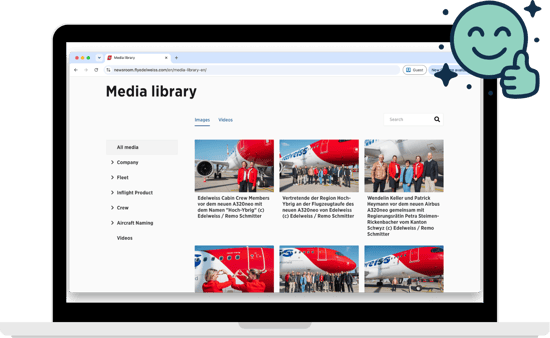
Edelweiss: Replacing PDF-heavy publishing
Edelweiss organizes its media library around the subjects journalists are most likely to search for, including its fleet, cabins, crew, management, and inflight products. Assets are available in high- and low-resolution formats, while the newsroom can be viewed in four languages.
What to learn from it: Your press kit should connect with your wider newsroom workflow. When publishing, distribution, translation, and media assets sit together, updates become faster and more consistent.
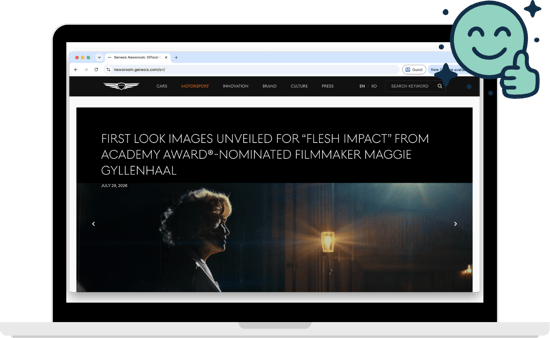
Genesis: Organizing content around products and stories
Genesis makes a large product portfolio easier to navigate by giving individual vehicle models and concepts their own categories. Journalists can also filter broader content by topics such as technology, motorsport, corporate news, and lifestyle, then download individual files or prepare a complete media kit.
What to learn from it: Organize content around the subjects journalists cover. Product-led brands can create clear routes into each model, collection, campaign or area of expertise.
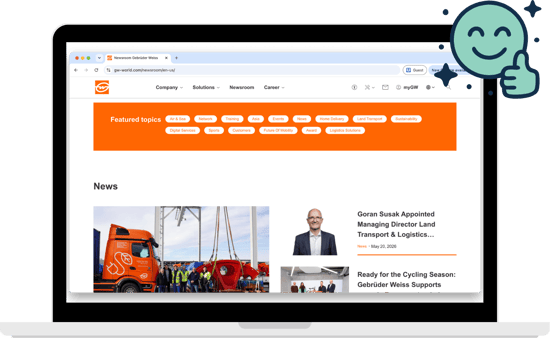
Gebrüder Weiss: Making a large media library usable
Gebrüder Weiss separates its core downloads into practical categories, including people, solutions, logos, and publications. Its wider newsroom also uses featured topics to connect media with subjects such as sustainability, air and sea freight, digital services, and the future of mobility.
What to learn from it: A large asset library needs strong organization. Useful filters, consistent naming, and flexible downloads help journalists find the right material without asking your team to send it manually.
FAQ: How to create a press kit
What is the difference between a press kit and a media kit?
The terms press kit and media kit are generally used interchangeably. Both describe a collection of approved information and assets created for journalists, editors, producers, and other media professionals.
Some companies use “media kit” for advertising information and audience demographics. Context usually makes the intended meaning clear.
Should a press kit be a PDF?
A PDF can be included as a downloadable summary, but it should not be the only version of your press kit.
An online press kit is easier to update, search, share, and connect to related content. It also reduces the chance that journalists will use an old version saved on their computer.
How long should a press kit be?
There is no fixed length because a digital press kit is a collection of resources rather than a single document.
Keep individual sections concise. A journalist should be able to understand the company quickly, then choose whether to explore more detailed information or download supporting assets.
How often should you update a press kit?
Review your press kit at least once every quarter. You should also update it whenever there is a change to your leadership team, company facts, product portfolio, visual identity, or media contacts.
Time-sensitive assets should include a clear publication or update date.
Do small businesses need a press kit?
A small business can benefit from a press kit as soon as it starts approaching journalists, podcasters, event organizers, or industry publications.
The first version can be simple. Start with an overview, founder biography, logo, a few strong images, and clear contact information. Add more resources as your media activity grows.
Can you create a press kit with Presspage?
Yes. Presspage’s brand newsroom software gives PR teams a central place to build, publish and, maintain a digital press kit alongside their wider company news.
You can bring together approved company information, spokesperson profiles, press releases, images, videos, and downloadable brand assets under one shareable URL. Your team can update the content directly, without waiting on IT, while clear page structures and GEO-friendly functionality help journalists, search engines, and AI systems find and understand the right information.
The takeaway
Building a press kit is mostly an exercise in removing obstacles.
Journalists should not need to email three people to confirm a company fact or have to pull a blurry logo from your LinkedIn.
Instead, build your press kit in a place your PR team can control, organize it around the information journalists actually need, and keep the content current under one single URL.
The result is a resource that supports every pitch you send, strengthens the accuracy of your company information online, and gives both journalists and AI systems a reliable source to work from.
Want to see how Presspage’s PR software helps teams centralize their company press kits and news in one searchable, shareable newsroom?